
TWO REFERENCE PHOTOS. ONE H3 PERFORMANCE.

MiniMax H3 Reference Video Generator

Looking for MiniMax H3 Max ref? Create a two-person orange-booth video here with MiniMax H3. Upload one photo for each adult, choose your take and see the credit cost before signing in.

Choose settings before sign-inPrivate downloads
THE STUDIO / 01

Make your entrance.

✦ Start with $5 · 120 credits
Performer 1LEFT
Performer 2RIGHT

Try the settings first. Sign in to upload your photos ↗

Generation settings
Make a
Video length
Export quality

10s · 720p · 120 credits · AI-generated audio · Results vary. Failed tasks return credits.

The $5 pack covers this take ↗One-time purchase · applicable taxes at checkout

10S STANDARD EXAMPLE / AI GENERATED
Actual AI example · 10s / 720p export / 120 credits
Input 1: fictional adult woman, placed leftInput 2: fictional adult man, placed rightThese two photos → this video.
AI video · 720p size export, no cuts or added music.
See the full comparison ↗

How to make your Hotel Lobby video.

01

Choose your takeTry length, quality, format and vibe before sign-in. One 10-second Standard costs 120 credits, covered by the $5 pack.

02

Sign in and build your duoSign in with Google, add two clear photos of consenting adults and buy enough credits for your take.

03

Follow your takeWatch the task status and return to it in your private library. Download a completed result; confirmed failed tasks return reserved credits.

TWO PHOTOS → A REAL AI RESULT

See a real reference video take.

Generated through this studio’s reference workflow from these fictional adult photos. One example; faces, movement and audio can vary.

THE SOURCE PHOTOS
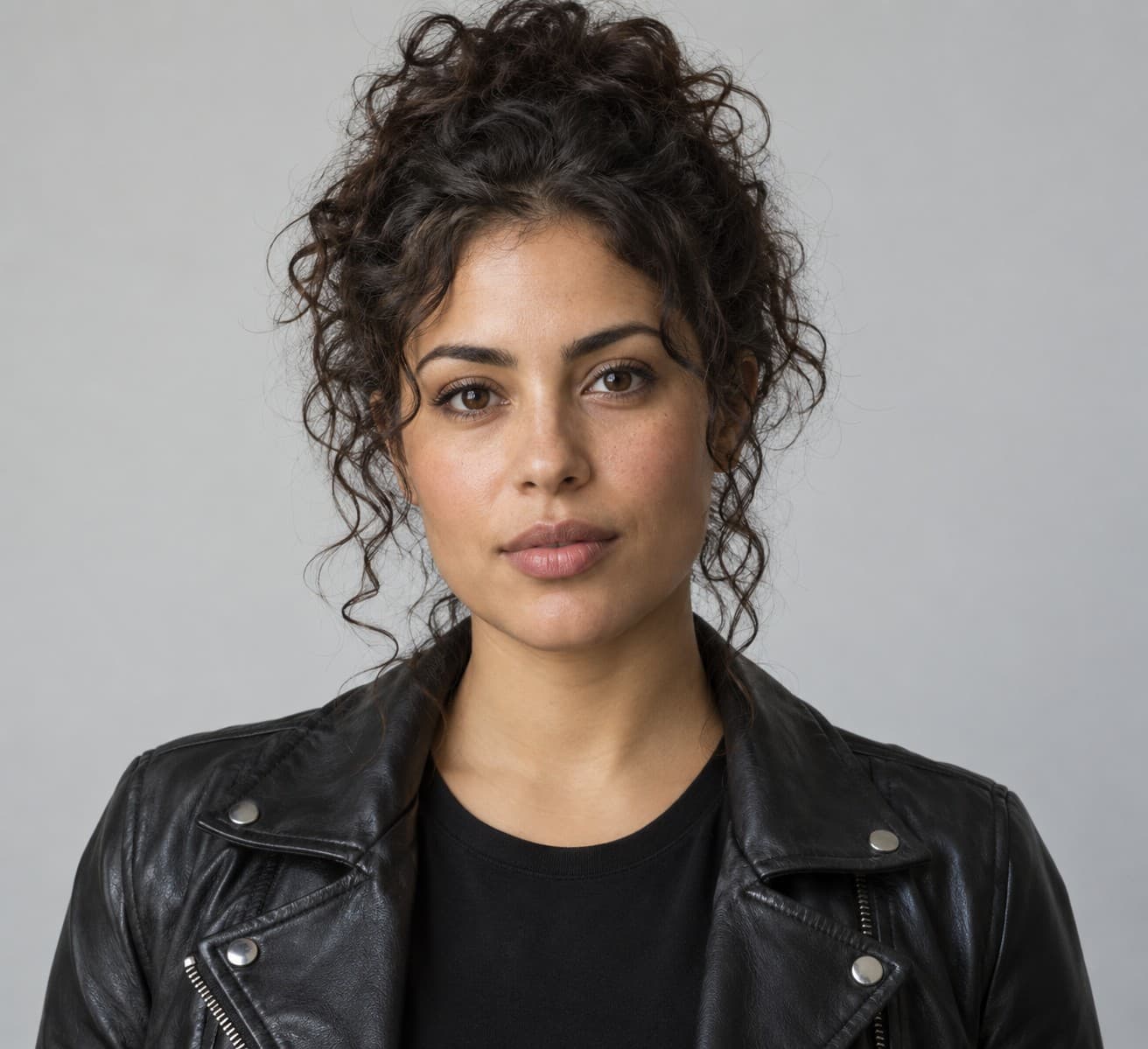
Source photo of a fictional adult woman with curly hair and a black jacket
Performer 1 LEFT
Source photo of a fictional adult man with a backwards green cap and a cream jacket
Performer 2 RIGHT

Two references. One new scene.

The studio prepares each photo as a separate reference image, then AI generates the scene, movement and audio.

Generation
AI reference video
Length
10s request · 10.144s file
Export
Standard · 720×1280 · 9:16
Native generation
768P
Credits
120 · covered by the $5 pack
Post-production
Size export only · no cuts or added music

Sound on: AI-generated audio. The original Hotel Lobby song is not included. Review each result before sharing.

Make a reference video take with your photos ↗
AI OUTPUT · 10s / 720p EXPORTAI video generation · fictional adult performers

How MiniMax H3 reference-to-video works

Reference-to-video uses your photos to guide who appears in a newly generated scene. In this studio, Performer 1 is the left reference and Performer 2 is the right reference. MiniMax H3 creates an orange recording booth, a shared hanging microphone and the selected performance vibe around the pair.

Both photos are passed as reference images. They are not the first and last frames of a transition. Use one visible adult per photo, clear faces and even lighting. JPG, PNG and WebP are supported, up to 10 MB each and at least 256 × 256 pixels. The studio prepares the references for H3 without cropping away the person.

MiniMax H3 and H3 Max ref: which model does this page use?

MiniMax H3 Max ref is shorthand for H3 Max reference-to-video. H3 and H3 Max are separate variants with different supported settings. This page's generator uses H3 for every quality tier.

MiniMax H3 supports native 768P or 2K output and requests from 4 to 15 seconds. The studio keeps the familiar Preview, Standard and HD export options: Preview and Standard generate at native 768P, then export at 480p or 720p; HD generates at native 2K, then exports at 1080p. Vertical 9:16 and landscape 16:9 are available.

Make a MiniMax H3 video in three steps

1. Choose your take. Start with a 10-second Standard video at 720p for 120 credits, covered by the $5 pack before applicable taxes. You can also choose 4 or 15 seconds, Preview or HD, vertical or landscape, and a playful duet, freestyle or relaxed session. The quote updates before you generate.

2. Sign in with Google, buy enough credits and upload the two photos. Confirm that both people are adults and that you have permission for AI transformation and your intended use. This page uses the same account, credits, content checks and private library as the homepage.

3. Generate, review and download. Your task stays linked to your account while H3 runs. Return with the same account to check progress. When it completes, review both faces, movement and audio, then download the MP4. Confirmed failed tasks return reserved credits; an uncertain submission needs a support check before retrying.

What the reference inputs control

The H3 API supports up to nine reference images, three reference videos and three reference audio files. Audio references must accompany an image or video reference. First/last frame inputs and multimodal reference inputs are separate modes and cannot be mixed in one request.

This focused studio accepts exactly two photos and supplies the scene and performance prompt. Reference-video uploads, uploaded audio, arbitrary text prompts and additional reference images are not controls in this release. Your two photos guide the performers; the selected vibe guides newly generated movement.

Avoid identity drift and conflicting references

A clear face in each photo gives the model more useful information than a distant subject, heavy filter, sunglasses or a crowd. Keep distinguishing facial details and clothing visible. Review the left/right assignments before starting; likeness and exact positions can still vary in the generated result.

H3 generates fresh motion and audio. It does not supply the original Hotel Lobby recording, a licensed song, an exact dance or a cloned artist voice. If you add a soundtrack after downloading, use music you are allowed to use. Watch the whole clip before sharing it and follow your destination platform's AI disclosure rules.

A few things to know.

What does MiniMax H3 Max ref mean?+

Ref means reference-to-video: reference media guide a new shot. H3 Max is a separate model variant. The working generator on this page uses H3 with your two photos as identity references.

Does changing quality switch this page to H3 Max?+

No. Preview, Standard and HD on this page all use H3. Quality selects the H3 native resolution and final export size. The homepage continues to offer its existing models.

Is MiniMax H3 generation free?+

No. Sign in and use purchased credits. The smallest pack is $5.00 for 120 credits before applicable taxes. Preview costs 4 credits per second, Standard 12 and HD 25; there are no free signup or daily credits.

Can I upload a reference video, audio or just one photo?+

This studio requires two adult reference photos. Although the H3 API supports other reference media, this page offers the same focused two-photo video workflow as our homepage.

Does MiniMax H3 include audio?+

H3 produces video with generated audio. Sound, facial likeness and movement vary. The original Hotel Lobby song and artist voice cloning are not included.

Where can I download my H3 video?+

A completed video appears in the studio and your private library. Sign in with the same Google account and use Download to save the MP4. Downloading a completed result does not use more credits.